
Download Audioflare – Cloud‑Based Audio Transcription, Analysis & Translation Tool
Overview
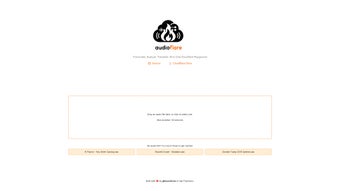
Audioflare is a cloud‑native software application designed to simplify the way individuals, teams, and enterprises handle spoken content. In an era where podcasts, webinars, and short voice notes dominate digital communication, having a reliable tool that can instantly turn audio into searchable text, extract meaningful insights, and translate the results into multiple languages is essential. Audioflare achieves this by combining three core engines—speech‑to‑text transcription, audio analytics, and multilingual translation—into a single, secure web interface. The platform’s drag‑and‑drop upload zone accepts common audio formats such as MP3, WAV, OGG, and AAC, and processes clips up to 30 seconds long. This length is ideal for interview excerpts, meeting highlights, voice memos, and quick briefing recordings.
Behind the scenes, each engine leverages state‑of‑the‑art deep‑learning models that have been trained on millions of hours of multilingual speech data. The models are continuously fine‑tuned, meaning users benefit from automatic improvements without having to download patches or reinstall software. Because all processing occurs in the cloud, users avoid the heavy CPU and GPU requirements typical of on‑premise speech‑recognition suites.
The result is a fast, reliable, and cost‑effective solution that scales effortlessly from a solo freelancer to a multinational corporation. Security is baked into every step: data is encrypted in transit with TLS 1.3, stored temporarily in encrypted vaults, and automatically purged after the results are delivered unless the optional secure archive feature is enabled. In short, Audioflare offers a frictionless workflow that turns spoken words into actionable data while keeping privacy at the forefront.
Whether you are a content creator needing quick transcripts for video subtitles, a marketer looking to analyze sentiment across podcast snippets, or a global team requiring instant translation of voice notes, Audioflare’s unified platform eliminates the need for multiple point solutions. The free tier allows up to 100 transcriptions per month, giving new users ample opportunity to explore the feature set before committing to a paid plan. For organizations that demand higher volume, priority processing, or custom SLA terms, the platform offers tiered subscriptions that scale with usage. By delivering transcription, analytics, and translation in one place, Audioflare reduces the time spent juggling separate tools and helps teams focus on creating value from their audio assets.
Key Features
- Instant Transcription: Convert up to 30‑second audio clips into editable text within seconds, with speaker‑identification tags and timestamps.
- Audio Analytics Dashboard: Gain insights such as sentiment polarity, keyword density, speaking rate, and emotional tone, all visualized in an easy‑to‑read panel.
- Multi‑Language Translation: Translate transcribed text into more than 20 languages, supporting global collaboration and multilingual publishing.
- Drag‑and‑Drop Upload & Cloud Storage Integration: Upload directly from local files, Google Drive, Dropbox, or OneDrive without leaving the browser.
- End‑to‑End Encryption: TLS 1.3 encryption protects data in transit; AES‑256 encryption secures data at rest, meeting GDPR and CCPA standards.
- RESTful API Access: Developers can programmatically submit files, retrieve transcripts, analytics, and translations, enabling automation in CI/CD pipelines.
- Automatic Model Updates: The service continuously incorporates the latest research in speech recognition and natural language processing, eliminating manual upgrades.
- Cross‑Platform Browser Support: Works on any modern browser (Chrome, Edge, Firefox, Safari) across Windows 10/11, macOS 12+, Linux, Android 8+, and iOS 13+.
Beyond the core list, Audioflare offers additional capabilities that enhance productivity. Users can edit transcripts directly in the split‑screen view, add custom tags, and export results in formats such as TXT, DOCX, SRT, and JSON. The analytics module provides exportable CSV reports, making it simple to feed data into BI tools like Power BI or Tableau.
For teams that need to collaborate, the platform supports shared workspaces where multiple users can comment on transcripts, assign tasks, and track revision history. The built‑in version control ensures that changes are logged, and previous versions can be restored if needed. All these features are bundled into a single subscription, which eliminates the need for separate transcription services, sentiment‑analysis dashboards, or translation APIs, thereby reducing overall operational costs and simplifying vendor management.
Installation, Setup & Compatibility
Audioflare’s cloud‑first architecture means there is virtually no installation required on the user’s side. Getting started is as simple as creating an account, selecting a plan, and uploading your first audio file. Follow these three steps to begin:
- Create an Account: Visit the Audioflare homepage, click “Sign Up,” and register using an email address or a single‑sign‑on (SSO) provider such as Google, Microsoft, or Apple. After confirming your email, you’ll be taken to the dashboard.
- Select a Subscription: Choose between the free tier (up to 100 transcriptions per month) or one of the paid tiers—Basic, Professional, or Enterprise—each offering higher limits, priority processing, and additional analytics.
- Upload & Process: Drag a supported audio file (MP3, WAV, OGG, AAC) into the upload box or click to browse. The system automatically detects language, format, and duration, then initiates transcription, analytics, and translation in parallel. Results appear in a split‑screen interface where you can edit, export, or share the output.
Because the heavy lifting happens on Audioflare’s servers, the application runs on any operating system that supports a modern web browser. This includes Windows 10/11, macOS 12+, popular Linux distributions (Ubuntu, Fedora, Debian), Android 8+ tablets and phones, and iOS 13+ devices. No plugins, extensions, or local runtimes are required, and the interface automatically scales for desktop, tablet, or mobile screens.
For organizations that need deeper integration, the optional API key can be generated from the user settings page. The RESTful API accepts the same 30‑second file limit and returns a JSON payload containing the transcript, analysis metrics, and translated strings. Authentication uses HTTPS‑secured bearer tokens, and rate limiting ensures fair usage across tenants. The API also supports webhook callbacks, allowing you to trigger downstream processes—such as uploading results to a content management system or notifying a Slack channel—without manual intervention.
Overall, Audioflare’s “install‑once‑use‑anywhere” model removes the compatibility headaches that plague traditional desktop speech‑recognition software. Teams can onboard new members instantly, and IT departments can avoid the overhead of managing licenses, updates, and security patches. The combination of browser‑based access, API extensibility, and robust encryption makes Audioflare a versatile choice for both individual power users and large enterprises.
Conclusion – Should You Download Audioflare?
Pros
- Lightning‑fast transcription for short audio clips with speaker timestamps.
- All‑in‑one platform that combines transcription, analytics, and translation.
- No local installation; works on any device with a modern browser.
- End‑to‑end encryption safeguards sensitive audio data.
- Generous free tier for testing and low‑volume use.
- Comprehensive RESTful API enables automation and custom workflow integration.
- Continuous model improvements keep accuracy high without user effort.
Cons
- Maximum audio length limited to 30 seconds per file, requiring manual splitting for longer recordings.
- Advanced analytics features may be overwhelming for non‑technical users.
- Premium plans are required for high‑volume or priority processing.
- Internet connectivity is mandatory; offline use is not supported.
For professionals who regularly work with short voice recordings—such as journalists extracting quotes, marketers analyzing podcast snippets, educators preparing subtitles, or remote teams sharing quick updates—Audioflare delivers a compelling blend of speed, accuracy, and convenience. The 30‑second limit is a deliberate design choice that keeps processing instantaneous and server costs low; if your workflow involves longer sessions, you can simply split the audio into multiple segments or combine the results after processing.
The free tier provides ample capacity to evaluate the core functionality, while the tiered pricing model scales smoothly as your needs grow. The integrated analytics dashboard adds value beyond simple transcription, giving you sentiment scores and keyword insights that can inform content strategy or customer sentiment tracking. And because everything runs in the browser, you avoid the maintenance burden associated with traditional desktop speech‑recognition suites.
Ready to streamline your audio workflow? Download Audioflare today and experience a faster, more secure way to turn speech into actionable data. Whether you’re a solo creator or part of a large organization, Audioflare’s cloud‑first approach ensures you stay productive without compromising privacy.
Audioflare stands out as a nimble, cloud‑first solution that delivers high‑quality transcription and insightful analytics without the baggage of traditional desktop software. Its biggest drawback is the 30‑second file limit, which may require users to split longer recordings manually. For the majority of business professionals, educators, and content creators who work with short voice notes, podcasts highlights, or interview excerpts, the trade‑off is more than acceptable. The free tier is generous enough for trial, and the paid plans scale smoothly as needs grow. Overall, it earns a solid 4.5 out of 5 stars.
Frequently Asked Questions
How long can an audio file be for transcription?
Audioflare processes files up to 30 seconds in length. For longer recordings, you can split the audio into multiple 30‑second segments and upload each segment separately.
Is my audio data stored after processing?
All audio files are encrypted in transit and at rest. By default, Audioflare deletes files from the server after the transcription, analysis, and translation results are delivered, unless you enable the optional “secure archive” feature.
Which languages are supported for translation?
Audioflare currently supports translation into 23 languages, including English, Spanish, Mandarin, French, German, Portuguese, Arabic, Russian, Japanese, Korean, and many more. The full list is available in the user dashboard.
Can I integrate Audioflare into my existing workflow?
Yes. Audioflare provides a RESTful API with endpoints for upload, transcription, analytics, and translation. You can generate an API key from the account settings and use it in scripts, automation platforms (Zapier, Make), or custom applications.
What pricing plans are available?
Audioflare offers a free tier (up to 100 transcriptions per month) and three paid tiers: Basic ($9.99 / month, 1,000 transcriptions), Professional ($29.99 / month, 5,000 transcriptions), and Enterprise (custom pricing, unlimited transcriptions, SLA support). All paid plans include priority processing and extended analytics.



.png)



